이미지처럼 동그란 로딩 UI를 만들고 싶다면 Image 컴포넌트의 Fill Method: Radial 360을 이용해서
fillAmount 값을 0 → 1로 천천히 증가시키면 된다!
✅ 1. UI 준비 방법
- Image 컴포넌트를 추가한 오브젝트를 만들고,
- Image Type을 Filled
- Fill Method를 Radial 360
- Fill Origin을 원하는 방향 (예: Bottom)
- Clockwise 체크 (시계방향)
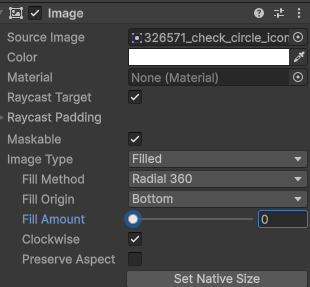
✅ 2. FillAmount를 코루틴으로 애니메이션 주기
using UnityEngine;
using UnityEngine.UI;
using System.Collections;

public class CircularLoader : MonoBehaviour
{
    public Image fillImage;          // 동그란 로딩 이미지
    public float duration = 2f;      // 로딩에 걸리는 총 시간

    private void Start()
    {
        StartCoroutine(AnimateFill());
    }

    IEnumerator AnimateFill()
    {
        float timer = 0f;

        while (timer < duration)
        {
            timer += Time.deltaTime;
            float fill = timer / duration;
            fillImage.fillAmount = fill;
            yield return null;
        }

        fillImage.fillAmount = 1f; // 정확히 100%로 마무리
    }
}'Unity > UI' 카테고리의 다른 글
| UI - Scroll View를 사용하여 UI 세로로 나열하기 (1) | 2025.08.05 |
|---|---|
| Unity - 시간 포맷 개념 정리(UI) (2) | 2025.07.02 |
| Unity n개 토글 만들기 (0) | 2025.05.02 |
| Unity 체력 UI 만들기 (1) | 2025.03.31 |