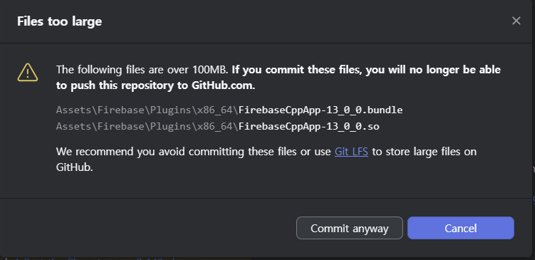
GitHub Desktop을 이용하여 협업을 진행 할 때 파일의 크기가
100mb가 넘어 푸시할 때 에러가 나는 경우가 있다ㅜㅜ
Files too large
If you commit these files, you will no longer be able to push this repository to GitHub.com.
🧠 원인 분석
- GitHub은 100MB 이상의 단일 파일은 Git 저장소로 푸시하는 것을 허용하지 않음.
- 에러 메세지 -> 너의 파일이 100mb가 넘는다. 이 파일을 커밋하면 이 리포지토리를 GitHub에 푸시할 수 없다!
이 경우엔 100mb가 넘는 파일을 그냥 제거하고 푸시하면
해결되는 문제이지만 해당 파일이 없으면 프로젝트 진행에 문제가 생겨 꼭 푸시 해야 할 때가 있다.
(나의 경우 firebase를 이용하여 프로젝트를 개발 중인데 100mb가 넘는 파일을 제거하면 코드에 에러가 생긴다)
이럴 때는 Git LFS를 사용하면 된다.
Git LFS (Large File Storage)는 대용량 바이너리 파일을 Git과 별도로 관리해주는 시스템이다.
GitHub는 Git LFS를 공식 지원하며 용량 제한 문제를 해결할 수 있다.
💡 Git LFS 설정 순서 (처음 한 번만)
1. Git LFS 설치
git lfs install
2. 확장자 등록 (.so, .bundle 등)
git lfs track "*.so"
git lfs track "*.bundle"
3. .gitattributes 파일 자동 생성됨 (꼭 커밋해야 함)
git add .gitattributes
git commit -m "Track large Firebase files using Git LFS"
4. 용량 큰 파일 다시 add
git add Assets/Firebase/Plugins/x86_64/FirebaseCppApp-13_0_0.bundle
git add Assets/Firebase/Plugins/x86_64/FirebaseCppApp-13_0_0.so
5. 커밋 & 푸시
git commit -m "Add FirebaseCppApp files via Git LFS"
git push origin main
★ 위 단계를 마치고 다시 GitHub Desktop으로 들어가 커밋 후 푸시하면 잘 될 것이다! ★
'Unity' 카테고리의 다른 글
| Unity - async 함수에 관하여 (2) | 2025.08.04 |
|---|---|
| 모바일 앱/게임 제작 시 필요한 Unity 권한 선언 종류 (0) | 2025.05.28 |
| Unity 로딩씬 구현하기 (0) | 2025.04.14 |
| Unity 자동슬라이드 Text 구현하기 (0) | 2025.04.14 |
| Unity 출석체크 시스템 구현하기 (2) | 2025.04.08 |